Log inRegister

Windows 11 issues
Leg dialoog telkens als ik unlock 04/07/2026
HotKeyServiceUWP.exe is a background process belonging to Hewlett-Packard (HP). It manages the Fn (function) keys, brightness, and volume controls on HP laptops. While essential for these shortcuts, it is infamous among users on Reddit for high CPU usage and generating empty dialog boxes. 1, 2, 3, 4]
If the process is malfunctioning or consuming too much battery/CPU on your machine, you can easily disable it using native Windows tools: 1, 2, 3]
- Press Windows + R to open the Run dialog.
- Type
services.mscand press Enter to open the Services panel. - Scroll down, right-click HP Hotkey UWP Service, and select Properties.
- Change the Startup type to Disabled, click Stop if it's running, and hit OK. 1, 2, 3]
Muis en toetsenbord reageren niet meer - 27/06/2026
- draadloos toetsenbord en draadloze muizen van Microsoft reageren niet meer, ook niet als ik de dongles rechtstreeks in de laptop plug - de USB's geven in ieder geval stroom, want mijn smartphone kan opladen
- oplossing: herstarten - heb wel geforceerd moeten herstarten, want het wieltje 'Restarting' bleef maar draaien
Show details while Restarting... / Updating...
In the registry, go to: HKEY_LOCAL_MACHINE\Software\Microsoft\Windows\CurrentVersion\Policies\System Create a new DWORD !VerboseStatus, and give it value 1.Blue screen - 06/06/2026
Zie: ChkdskAndSfcAndDism#Error:_0x800f0915_45_The_repair_content_could_not_be_found_anywhere.Constantly spinning wheel
see: Win11FileExplorer#Constantly_spinning_wheel_45_SOLVEDScan a document or picture fails
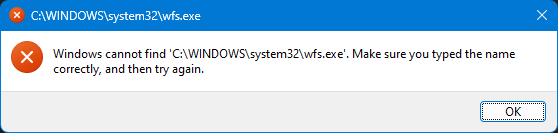 Blijkbaar is dat om dat Fax & Scan niet geïnstalleerd is:
You can install Windows Fax and Scan via Optional features.
Blijkbaar is dat om dat Fax & Scan niet geïnstalleerd is:
You can install Windows Fax and Scan via Optional features. - Open Settings → System → Optional features (= voorlaatste item).
- Click "View features"
- Type "fax".
- Tick the "Windows Fax and Scan" option.
- Click Next.
- Click Install.
tags laptop Lemmens Software Windows 11 Windows 11 File Explorer constantly spinning wheel wfs wfs.exe C:\WINDOWS\system32\wfs.exe


 Copyright © by the contributing authors. All material on this collaboration platform is the property of the contributing authors.
 Ideas, requests, problems regarding Foswiki? Send feedback