Log inRegister

Foswiki issues on AWS servers
Voor de volledigheid van deze wiki vermeld ik ze hier ook, het gaat uiteindelijk om hetzelfde soort machines (Ubuntu 24.04 op het moment van schrijven). Op de AWS-server was er wel een hele boom foswiki/lib/CPAN/lib, terwijl het bij Strato maar om één module ging, dus op dat vlak waren ze dan weer niet vergelijkbaar.Error when hovering over a user name instead of showing the nobody pic (07/'26)
Zie: Question2247: user placeholder image doesn't appear, error message instead (Exception 420) - Support - Foswiki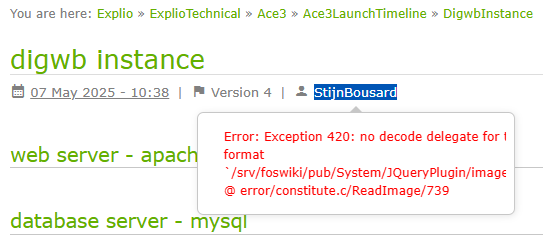
OPLOSSING
/home/admin/ImageMagick opnieuw installeren met toevoeging van de png-library- eerst de libraries toevoegen
sudo apt-get install libpng-dev libjpeg-devof
als je wil overdrijven
sudo apt-get install libperl-dev libjpeg-dev libghc-bzlib-dev libdjvulibre-dev libwebp-dev libgraphviz-dev liblcms2-dev liblzma-dev libpango1.0-dev libwmf-dev libgs-dev ghostscript libltdl-dev libguile-ltdl libpng-dev libtiff-dev
- dan ImageMagick opnieuw configureren en installeren:
sudo ./configure --with-png=yes
...
sudo make -j4
...
sudo make install
...
sudo ldconfig
...
ldd /usr/local/bin/magick | egrep -i png
...
ldd /usr/local/bin/magick
En huppakee:
purgeCache fails (07/'26)
While investigating the ImageMagick error, I noticed that the purgeCache also failed:user@server:/srv/foswiki/tools$ sudo ./purgeCacheIk dacht, laten we Perl bijwerken:
UUID.c: loadable library and perl binaries are mismatched (got first handshake k ey 0xeb00080, needed 0xf380080)
$ sudo cpan
cpan[1]> upgradeYour perl and your Config.pm seem to have different ideas about theIk had dan het (lumineuze?) idee om eens alle handmatig aan de Foswiki-boom toegevoegde CPAN-modules uit te schakelen: /srv/foswiki/lib/CPAN hernoemd naar /srv/foswiki/lib/---CPAN--- En dan krijg je een voor een de missende libraries te zien: user@server:/srv/foswiki/tools$ sudo ./purgeCache
architecture they are running on.
Perl thinks: [perl-base]
Config says: [x86_64-linux-gnu-thread-multi]
This may or may not cause problems. Please check your installation of perl
if you have problems building this extension.
Can't locate File/Copy/Recursive.pm in @INC (you may need to install the File::Copy::Recursive module)
user@server:/srv/foswiki/tools$ sudo cpan File::Copy::Recursive | 2026-07-16T11:47:10+02:00 error | Foswiki::Plugins::TimeCalcPlugin could not be loaded. Errors were:
Can't locate Time/ParseDate.pm in @INC (you may need to install the Time::ParseDate module) (@INC entries checked: /srv/foswiki/lib ../bin /etc/perl /usr/local/lib/x86_64-linux-gnu/perl/5.38.2 /usr/local/share/perl/5.38.2 /usr/lib/x86_64-linux-gnu/perl5/5.38 /usr/share/perl5 /usr/lib/x86_64-linux-gnu/perl-base /usr/lib/x86_64-linux-gnu/perl/5.38 /usr/share/perl/5.38 /usr/local/lib/site_perl /srv/foswiki/lib/CPAN/lib) at /srv/foswiki/lib/Foswiki/Plugins/TimeCalcPlugin.pm line 39.
BEGIN failed--compilation aborted at /srv/foswiki/lib/Foswiki/Plugins/TimeCalcPlugin.pm line 39.
path-linux-gnupath-base path-linux-gnupath path path path)
user@server:/srv/foswiki/tools$ sudo cpan Time::ParseDate user@server:/srv/foswiki/tools$ sudo ./purgeCache
Can't locate CHI.pm in @INC (you may need to install the CHI module) (@INC entries checked: /srv/foswiki/lib ../bin /etc/perl /usr/local/lib/x86_64-linux-gnu/perl/5.38.2 /usr/local/share/perl/5.38.2 /usr/lib/x86_64-linux-gnu/perl5/5.38 /usr/share/perl5 /usr/lib/x86_64-linux-gnu/perl-base /usr/lib/x86_64-linux-gnu/perl/5.38 /usr/share/perl/5.38 /usr/local/lib/site_perl /srv/foswiki/lib/CPAN/lib) at /srv/foswiki/lib/Foswiki/Contrib/CacheContrib/Core.pm line 22.
BEGIN failed--compilation aborted at /srv/foswiki/lib/Foswiki/Contrib/CacheContrib/Core.pm line 22.
Compilation failed in require at /srv/foswiki/lib/Foswiki/Contrib/CacheContrib.pm line 53.
Foswiki detected an internal error - please check your Foswiki logs and webserver logs for more information.
user@server:/srv/foswiki/tools$ sudo cpan CHI En daarna ging de purgeCache wel. Voorlopig laat ik de folder ---CPAN--- nog staan, je weet maar nooit...




 Copyright © by the contributing authors. All material on this collaboration platform is the property of the contributing authors.
 Ideas, requests, problems regarding Foswiki? Send feedback