Log inRegister

Microsoft Edge nuisances
Disable 'Use recommended browser settings'
> 28/05/2024
You can achieve this with Winaero Tweaker:- Microsoft Edge > Disable Annoyances and Bloat
- Annoyances > Disable the Set Edge as default browser prompts
- open the Registry Editor
- go to HKEY_LOCAL_MACHINE\Software\Policies\Microsoft\Edge
- create a new DWORD DefaultBrowserSettingEnabled with value 0
< 28/05/2024
- open Edge
- go to edge://flags/
- disable 'Show feature and workflow recommendations' (#edge-show-feature-recommendations)
Disable 'Would you like to set Microsoft Edge as your default browser?'
- open the Registry Editor
- go to HKEY_CURRENT_USER\Software\Policies\Microsoft
- create a new key Edge
- create a new DWORD DefaultBrowserSettingEnabled with value 0
Disable menu transparency
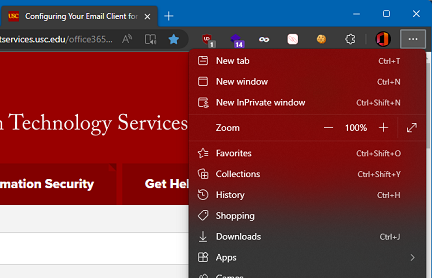 Here's how to disable menu transparency:
 - open Edge
- go to edge://flags/
- disable 'Enable Windows 11 Acrylic effect in menus to Disabled' (#edge-visual-rejuv-materials-menu)
- restart Edge


 Copyright © by the contributing authors. All material on this collaboration platform is the property of the contributing authors.
 Ideas, requests, problems regarding Foswiki? Send feedback